You love the outdoors. The fresh pine scent. The crackling campfire. The absolute panic when you realize you have zero bars and that urgent email isn’t going to send itself.
For modern adventurers, staying connected isn’t about scrolling TikTok from a tent. It’s about safety. It’s about remote work. It’s about navigation. Sure, unplugging sounds romantic. But so does knowing a thunderstorm isn’t heading your way at 3 AM.
The good news? You can have both. You can sip coffee by the lake while joining a Zoom call. You can check weather radar without driving back to town. You just need strategy. You need gadgets. You need this guide.
Here are 20 ridiculous, wonderful, and scientifically proven ways to stay connected when civilization feels far away.
Table of Contents
1. Invest in a Cellular Booster
Imagine a tiny superhero for your signal. That’s a cellular booster.
Devices like WeBoost work like magic. They use an external antenna to grab faint signals from distant towers. Then they amplify that signal inside your vehicle or camp. It’s like giving your phone a megaphone.
Here’s the kicker. These boosters don’t create signal where none exists. They just make weak signal stronger. If you have one bar, you might get three. If you have zero bars, well, keep reading.
Installation takes minutes. The difference is immediate. Your videos load. Your calls don’t drop. Your campmates stop throwing pine cones at you for pacing around looking for signal.
2. Utilize Satellite Messengers
Sometimes you go places where towers fear to tread. Deep canyons. Dense forests. The middle of absolutely nowhere.
This is when you need satellites. Devices like Garmin inReach or Zoleo connect to the Iridium satellite network. That’s the same network spies probably use. Very fancy stuff.
These gadgets let you send two-way texts. They share your GPS location. They have SOS alerts for genuine emergencies. Want to message your mom from a mountain pass? Done. Want to tell your boss you’ll be late because a bear stole your shoe? Also possible.
They require a subscription. They cost money. But so does search and rescue. Think of it as cheap insurance with texting perks.
3. Check Coverage Maps Before You Go
Guesswork is for choosing campsites. Not for finding signal.
Apps like Coverage? and OpenSignal are your new best friends. They overlay cellular provider maps onto your planned coordinates. You see exactly where Verizon works and where AT&T cries.
Here’s the pro move. Check multiple providers. Switch networks mentally before you leave. Know that the north side of the lake has signal but the south side doesn’t. Plan accordingly.
This takes five minutes at home. It saves five hours of frustration later. Do it.
4. Leverage Starlink Mini
Elon Musk’s satellites are everywhere now. Including above your campsite.
The portable Starlink Mini is absurdly cool. It’s a small dish that connects to low-orbit satellites. It provides high-speed, low-latency broadband. We’re talking video calls. Streaming. Uploading photos of your campfire in real-time.
The catch? You need a clear view of the sky. Trees block it. Mountains block it. Your friend’s giant head blocking the view also blocks it.
But if you’re in the desert, a field, or above treeline, this thing delivers. It’s expensive. It’s overkill for weekend trips. For digital nomads living in vans? It’s life-changing.
5. Use a Dedicated Mobile Hotspot
Your phone is a multitasker. It texts. It emails. It runs your camera. It also dies faster than a campfire in a rainstorm.
Stop draining your phone battery. Get a dedicated hotspot. These devices, often called Jetpacks or MiFi, exist solely for internet. They have better antennas. They have dedicated data plans. They sit there quietly, doing one job well.
Connect your laptop to the hotspot. Connect your tablet. Keep your phone free for photos and bear-alerting duties.
Plus, hotspots often get better signal than phones. It’s science. Or magic. Either way, it works.
6. Download Offline Maps
This tip requires zero signal. That’s the beauty of it.
Google Maps lets you download areas for offline use. Gaia GPS and AllTrails do the same. You download topography, road data, trail information. Then you navigate without any active bars.
Your phone becomes a GPS device. Your location dot moves across saved maps. You never get lost. You never need data.
Do this before leaving pavement. Seriously. Right now. Go download your destination. I’ll wait.
7. Optimize Your Phone Settings
Your phone is secretly eating your data. It refreshes apps in the background. It fetches emails constantly. It updates Instagram because it assumes you care.
Turn all that off. Disable Background App Refresh. Set email to manual fetch. Stop apps from updating unless you open them.
This saves data for things that matter. Like loading that map when you’re hopelessly turned around. Or sending that “I’m alive” text.
Your battery thanks you too. It’s a win-win.
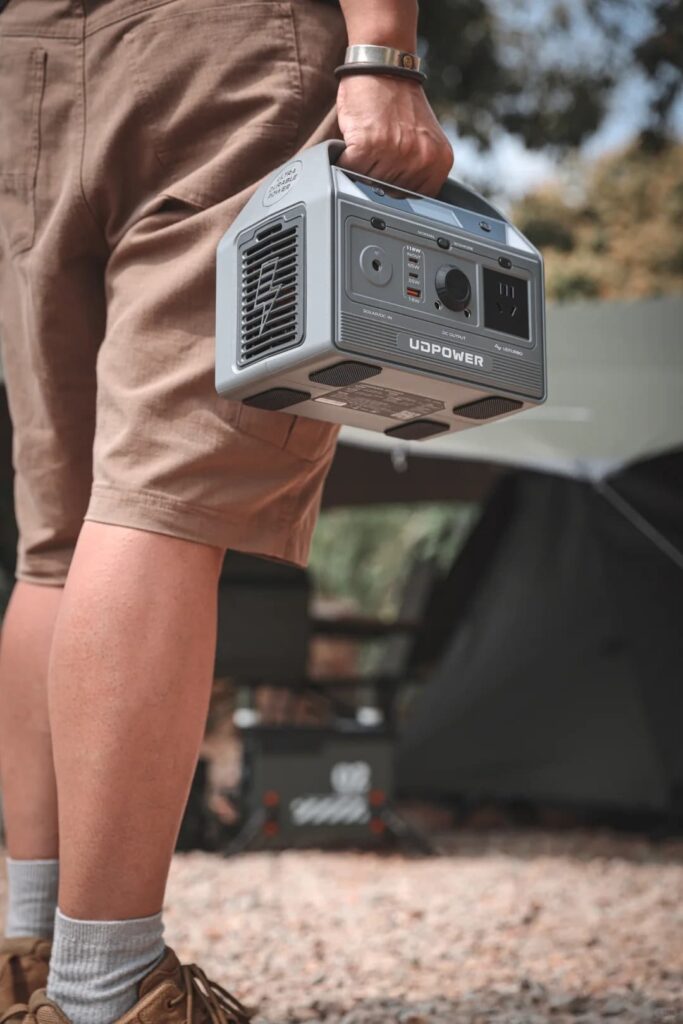
8. Pack a High-Capacity Power Station
All these gadgets need juice. Phones. Hotspots. Boosters. Satellite messengers. Starlink dishes. That’s a lot of hungry devices.
Enter the portable power station. Brands like Jackery and EcoFlow make battery packs that resemble small coolers. They hold massive amounts of power. They have multiple outlets. Some even accept solar panel input.
Pair one with solar panels. Now you have infinite power. The sun charges the station. The station charges your devices. Your devices keep you connected. It’s a beautiful, renewable cycle.
No more fighting over the car charger. No more running the engine just to charge a phone. Pure freedom.
9. External Antenna Mounts
Here’s a secret from van lifers. Antenna height matters. A lot.
If you camp in a vehicle, mount a directional antenna on a pole. Point that pole toward the nearest cell tower. Raise it as high as possible.
The signal gain is significant. We’re talking faster speeds. Fewer dropped connections. Less yelling at your router.
Even without a vehicle, you can improvise. Hang a antenna from a tree branch. Attach it to a hiking pole. Get that thing up high. Gravity works against signal. Fight back.
10. Use Wi-Fi Calling
Sometimes you find Wi-Fi in unexpected places. Visitor centers. Cafés. Ranger stations with surprising tech budgets.
Enable Wi-Fi Calling in your phone settings. Now that café Wi-Fi becomes your cellular network. You make standard voice calls over internet. Clear calls. No dropped connections. No one knows you’re calling from a picnic table.
This works internationally too. Call home from anywhere with Wi-Fi. No roaming charges. No explaining why you sound echoey.
Enable it before you leave. It’s buried in settings. Find it now.
11. Check Campendium Reviews
Campendium is a website for campers. They review campsites. They post photos. They also post Speedtest screenshots.
Seriously. Users upload their Verizon speeds. Their AT&T results. Their T-Mobile triumphs and failures.
Search for your specific campsite. See what real people experienced last week. Know that Site 17 has blazing fast 5G while Site 18 is a dead zone.
This information is gold. Use it. Book accordingly.
12. Consider a Dual-SIM Setup
Different carriers work in different places. Verizon dominates one valley. AT&T rules the next. T-Mobile laughs at both from somewhere else.
Modern phones support dual SIMs. Often one physical SIM and one eSIM. Use this power.
Activate two carriers on one phone. Switch between them based on signal strength. Increase your chances of finding a usable tower.
It’s like having two fishing lines in the water. Better odds of catching something.
13. Sync Your Files Locally
Remote work in the woods sounds dreamy. Until you need that one file and the cloud won’t load.
Before leaving civilization, download everything. Documents. Spreadsheets. Presentations. Videos. Music. Podcasts. Everything.
Store them locally on your hard drive. Now you don’t need data to work. You don’t need to stream. You just open files and do your job.
Cloud syncing is for coffee shops. Local files are for mountains. Be prepared.
14. Elevate Your Device
Ten feet changes everything.
Signal travels in straight lines. Hills block it. Trees block it. The ground definitely blocks it.
Put your hotspot on top of your vehicle. Hang your phone from a branch. Climb a small rock and hold your tablet aloft like the Statue of Liberty.
Sometimes that tiny height gain pushes you above obstructions. Suddenly 3G becomes 4G. Suddenly emails send. Suddenly you look ridiculous but feel victorious.
Worth it.
15. Bring a Long-Range Wi-Fi Extender
Some campgrounds have public Wi-Fi. Ranger stations offer it. Developed parks provide it.
The problem? You’re never close enough. The signal reaches the parking lot but not your tent.
Enter the long-range Wi-Fi extender. These devices look like small satellite dishes. They pull distant Wi-Fi signals and rebroadcast them nearby.
Point it toward the source. Connect your devices. Enjoy internet that traveled further than your hiking boots did.
It’s niche. It’s specific. It’s glorious when it works.
16. Monitor Your Data Cap
“Unlimited” plans lie.
Most carriers throttle speeds after a certain point. You get 50GB of fast data, then dial-up speeds until next month. Streaming video counts against this. Uploading photos counts. Everything counts.
Use data-tracking apps. Know your usage. Pace yourself.
If you blow through your cap on day three, day ten gets painful. Manage data like you manage campfire wood. Ration wisely.
17. Pack a Weather Radio
Sometimes everything fails. Batteries die. Signals vanish. Satellites hide.
A hand-crank NOAA Weather Radio saves the day. No batteries required. No signal needed. Just elbow grease and hope.
Crank the handle. Receive emergency broadcasts. Know that the storm is coming even without your phone alerting you.
It’s analog. It’s reliable. It’s the backup for your backups.
18. Use Lite Versions of Apps
Weak signal hates fancy apps. Instagram loads images. Facebook loads videos. Both load slowly and eat data.
Switch to browser-based versions. Use Facebook Lite. Use Twitter’s mobile site. Strip away the bells and whistles.
Text loads faster than images. Images load faster than video. Video doesn’t load at all on one bar.
Adjust expectations. Embrace simplicity. Read words instead of watching reels.
19. Keep Devices Warm
Cold kills lithium-ion batteries. Not metaphorically. Literally kills them.
Your phone dies at 20% when temperatures drop. Your hotspot shuts down unexpectedly. Your power bank refuses to output.
Keep devices warm. Sleep with your phone in your sleeping bag. Store your hotspot in an insulated pouch. Tuck batteries into coat pockets.
Warm batteries hold charge. Cold batteries hold nothing. Temperature matters more than you think.
20. Set an Emergency Check-In Schedule
This tip requires zero tech. It requires trust.
Tell someone at home exactly when you’ll be online. “I’ll text Tuesday at 6 PM. If you don’t hear from me by 8 PM, worry.”
Now they don’t panic if you’re out of range. They don’t call search and rescue because you forgot to charge your phone. They wait patiently, knowing your schedule.
It’s simple. It’s effective. It keeps everyone sane.
Conclusion
Connectivity in the backcountry isn’t all or nothing anymore. It’s a spectrum. It’s choices. It’s layering boosters, satellites, and smart habits.
You can have signal without sacrificing solitude. You can work remotely without hating every second. You can stay safe without staring at screens constantly.
The key is preparation. Check maps before leaving. Pack the right gadgets. Keep batteries warm and heads cool.
Your “Out of Office” reply becomes a choice. Your adventures become longer. Your Wi-Fi becomes wherever you park.
Now go outside. Take your gadgets. Find that perfect spot where pine trees meet ping times. The wilderness is waiting, and it’s surprisingly well-connected.